The rate at which I was learning information from the tutorial that I had originally intended to follow was not sufficient for the accelerated pace that this project needed to undergo, so I had to give up learning the program slowly in favor of experimentation, trial and error, and generally just winging it to see if something would work out.
After hours of crashing, dealing with what the program could and couldn't handle, and lots of inside out materials that made the entire model explode, this is what I ended up being able to create.
I wanted to focus on what I believed to be the most difficult part of the backpack to achieve, the rings at the top that are cinched using a rope. It turned out being extremely difficult, but here it is! I also got a single pocket on and began to learn how to make creases and folds to properly reflect the way I wanted the material to bend.
This lack of progress sets me behind in my accelerated schedule of learning & doing, so I'll have to crunch hours this following week in order to make up for the lost time from learning.
First I will show you the schedule and explain it sprint by sprint. With Sprint 1 being the first one, I'll showcase what I worked on this sprint during that explanation.
First I wanted to show the entire asset list, with the images that we compiled of them as well. There is a much nicer Pureref that we use for all of our references that has several full sized images next to each asset's name. However; it was asked that we include them on this sheet so they are on there!
Highlighted are each of my tasks for the rest of the semester! I don't have many, but a few of them are Hero assets so that lines up with our expectations for time investments.
Sprint 01 Tasks
Victor's Hands
This is what was in the engine for the hand as of last semester. I had created the initial sculpt and auto-retopoed it in ZBrush for Abby to rig so that we could replace the default UE4 mannequin hands that you use in VR with Victor's hands. For this Sprint, I agreed to finish the hands from a modeling and texturing stand point.
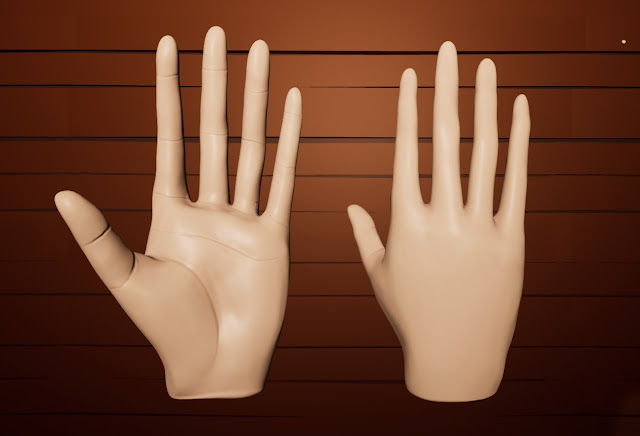
In the movie, Victor's hands have very little detail. They use simple lines to show the difference in the hand joints, and they don't include any finger nails. Of course, this looks entirely creepy outside of this movie, but I did my best below.
I made the fingers roughly the same length as Victor's in the movie while still ensuring that they would fit with the rig that the UE4 default hands had. These are the hands in engine in our Bar scene. They aren't set up as the replaced hands yet because they need to be re-rigged. However, the texture and new model is in engine ready for the rig when Abby completes it this upcoming Sprint.
The hands look very orange in this light, however they are in actuality very pale, much like Victor is in the movie!
Sprint 02 Tasks
Bar Top (Pentagon)
I will be sculpting and texturing this piece for Sprint 02. Just the top of the bar, the bottom is going to be the same as the floor. The game res and UVs are already done for this piece by Lori.
Hanging Lamp Over Piano
For this piece I will be sculpting and texturing it for Sprint 02. The game res and UVs were already done last semester by Yami
Sprint 03
Bar - Shelving (Open Coffin)
The game res and UVs are already done for this, so I will just be sculpting and texturing it.
Emily's Boquette (Rose, Lily, Baby's Breath)
I will be creating a game res for this, UVing, and texturing this piece.
Sprint 04
Round Picture Frame
The game res and UVs are already done for these so I will just be sculpting and texturing them
Barrel
The game res and UVs are already done for this so I will just be sculpting and texturing them.
The goal of this project is to create a hyper realistic game-ready backpack asset that has realistic wear and tear on it! I'll be making the backpack inside of Marvelous Designer, a program that I am NOT familiar with it all. In order to get familiar with the program, I've gotten my hands on some tutorials to learn the interface and the language associated with the program! It has a lot of things that other programs do not and a lot of terminology that I think it usually used with seamstresses and tailors.
Learning Marvelous Designer
In order to keep track of what I've been learning, I've been taking very specific notes on the entire process! I plan on organizing these notes further and creating "one page designs" to showcase some of this learning material in the future so that it's easier for others to learn after me!
As of writing this post I am currently on Video 11 - Garment Fit, so any information on this document after that are things that I've been adding as I've been learning more!
Gathering References
I found a backpack online that I think has a great amount of folds and various textures to keep things interesting while I work on this project!
The Plan
Week 01 — Learning Marvelous, Collecting References! Week 02 — Create Pattern in Marvelous, begin learning how to transfer to ZBrush & Maya for Retopologizing Week 03 — Retopologizing, UVing, Texturing Week 04 — Texturing, Final Renders in Marmoset, finish MD Guide (Maybe)
This week I worked on making the crab appear more "cute" and "friendly" to the player! We started out with a much more realistic looking crab, but I narrowed down what traits made crabs look cute. What I found in my research was that crabs with big eyes that were mostly black were adorable, and crabs with small faces were adorable. I was able to find lots of things that did not look cute on a crab. Super pointy legs made them look too spider-like, any kind of open-mouth looked weird on most of them. Eyes that had color and whites looked strange and too much like people eyes. I found that mostly rounded shapes looked best, while keeping away from any sharp pointed edges. I then worked on moving the sculpt in this direction, and think I did so pretty well!
I did not get this version of the crab in engine yet, but it will be in engine soon. A lot of my time was worn away because this break I got major surgery to have my gallblader removed. Monday (today) was my first day actually back working, but I'm finding some major pain if I sit at my desktop propping my upper body up for too long. Hopefully this week as I recover more I'll be able to really put in some hours!
For the first week of this project, I focused on collecting references to use for the crab as well as beginning to build upon the sculpt that Nick had already created. Since we are going with Orb's style (which is inherently Blizzard's style because that's who he works for) I decided to pull what I could for stylized references of crabs from World of Warcraft. I then did some digging to try and find crabs that fit with the geometry already created. Using the Ghost Crab reference that was given as a starting off point, I also found a similarly shaped Galapagos Painted Ghost Crab that had a coloring similar to what I believe the crabs should be at the end of the project. They also had more defined eyes which appeared to be more inline with the original concept.
I then began editing the sculpt that was already provided by Nick. I added the definition to the legs, to the top and bottom of the body, as well as to the claws and the eyes / face. I tried to develop some separation where the leg joints met one another so that it would be easier to tell they were separations in the future utilizing Folygon's Cloth Fold brush.
This week I worked on getting the transitional effect set up properly. The original slide from right to left of crows came across too cheaply. I instead decided to use a hand-drawn sprite sheet placed into a flipbook material to try and get that to render onto the post processing effect on command instead.
I ran into several issues with it. The first was getting it to show up at all, which was solved by a multiply node with the Post Processing 0 node. The second was getting the flipbook to render at the right scale. This was solved by ensuring that the rows and columns were set properly. The third was ensuring that it could be played on command as opposed to just continuously playing. The solution that I currently have set up for that is a IF statement that checks to see if two numbers are equal to each other. Then, within the blueprint I manually change that variable to ensure they are equal to each other when I want it to play.
Currently the effect plays twice, I'm doing this so that we have approximately how long it will take for the effect to play without me hand-animating all 20 of the frames without testing. This is a test that I will expand upon as I finish hand-drawing the animations for this flipbook now that I know it works within the engine.
Here are the two parts to the Blueprint I created to trigger the level transition:
On begin play I get the post processing, create a variable with it, set it to unbound, create a material instance of the material inside of the post processing material, and set the scalar parameter within that material instance called "ifZerothenPlay" to -1.
For this second half, I am first checking to make sure that the object overlapping the trigger box is the hands of the player. Then in a sequence, it does the following: 1. Get the material instance parameter of "ifZerothenPlay" and changes that to 0 in order to begin the flipbook animation. Then there is a delay so that the animation can play, before it is once again set to 1 to turn it off. 2. Get the current player camera and start a fade on it to black, with a slight delay. Then the level designated will open.
I plan to finalize the last 7 frames of the animation so that it is complete for a first pass in the following weeks. As a reminder written here: I will be having surgery to remove my gallbladder shortly and will know tomorrow (Monday) when that will be happening. It'll likely be in a few days / a week. My next turn it may have less work as a result of this.